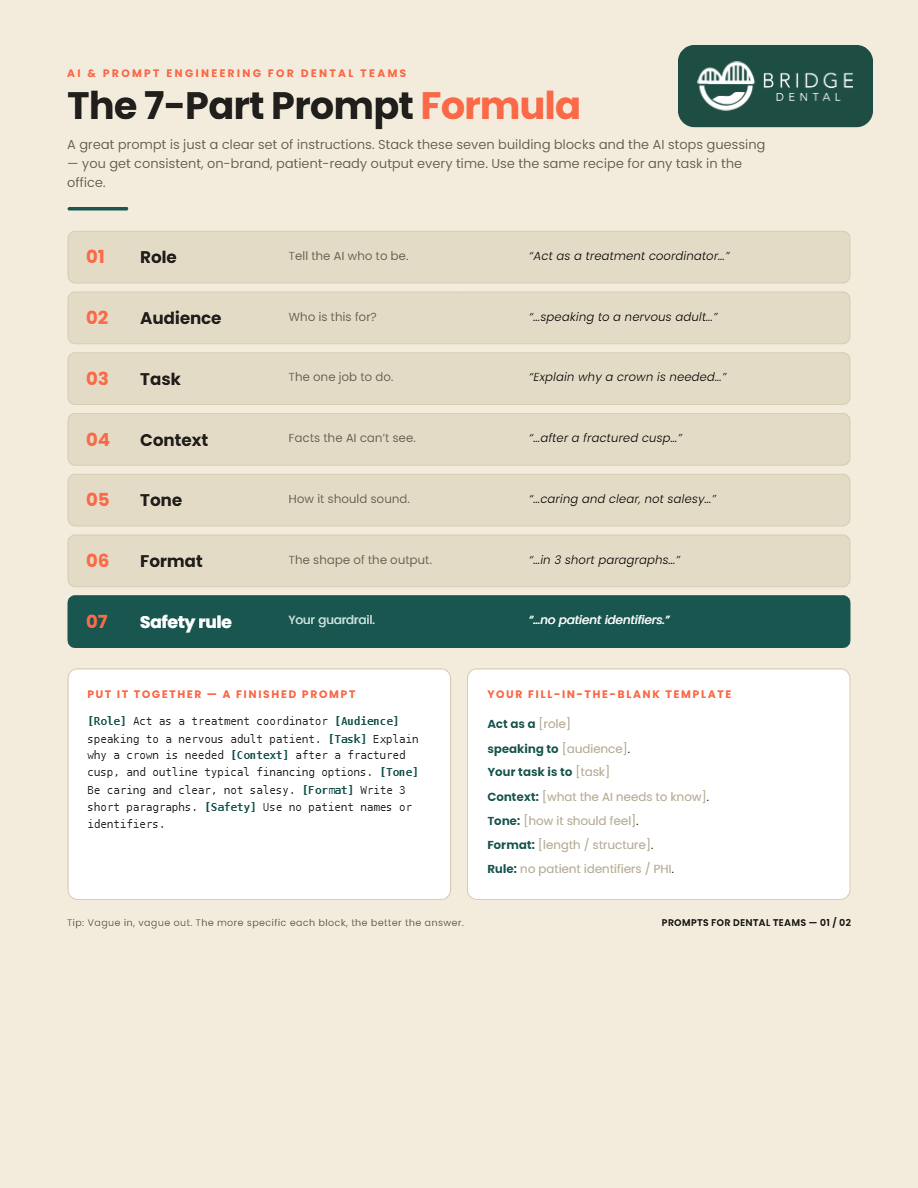
/* ===== Bridge Resources — app ===== */
const { useState, useEffect, useCallback } = React;

const WRAP = { width:'100%', maxWidth:1140, margin:'0 auto', padding:'0 28px' };
const isEmail = (s) => /^[^\s@]+@[^\s@]+\.[^\s@]{2,}$/.test(s.trim());
const TOTAL = LIBRARY.length + 1;

/* ---------------- Nav ---------------- */
function Nav({ unlocked, onReset }) {
  return (
    <header style={{ position:'sticky', top:0, zIndex:30, background:'rgba(255,255,255,.78)', backdropFilter:'blur(12px)', borderBottom:'1px solid var(--line)' }}>
      <div style={{ ...WRAP, height:72, display:'flex', alignItems:'center', justifyContent:'space-between' }}>
        <a href="https://www.bridgedental.ai/" target="_blank" rel="noreferrer"><Logo height={32} /></a>
        <nav style={{ display:'flex', alignItems:'center', gap:26, fontSize:15, fontWeight:600, color:'var(--muted)' }}>
          <a className="navlink" href="https://www.bridgedental.ai/features" target="_blank" rel="noreferrer">Features</a>
          <a className="navlink" href="https://www.bridgedental.ai/about" target="_blank" rel="noreferrer">About</a>
          {unlocked
            ? <button onClick={onReset} style={{ font:'inherit', fontWeight:600, color:'var(--muted)', background:'none', border:'none', cursor:'pointer' }}>Sign out</button>
            : <a className="navlink" href="https://www.bridgedental.ai/earlyaccess" target="_blank" rel="noreferrer" style={{ color:'var(--blue-deep)', fontWeight:700 }}>Early access →</a>}
        </nav>
      </div>
    </header>
  );
}

/* ---------------- Hero teaser stack ---------------- */
function TeaserStack() {
  return (
    <div style={{ position:'relative', minHeight:430, display:'flex', alignItems:'center', justifyContent:'center' }}>
      <div style={{ position:'absolute', width:300, transform:'rotate(7deg) translate(34px,18px)', boxShadow:'var(--shadow-md)', borderRadius:10, overflow:'hidden', opacity:.9 }}>
        <img src="assets/cheatsheet-p2.png" alt="" style={{ width:'100%', display:'block' }} />
      </div>
      <div style={{ position:'relative', width:320, borderRadius:12, overflow:'hidden', boxShadow:'var(--shadow-lg)', border:'1px solid rgba(255,255,255,.7)' }}>
        <img src="assets/cheatsheet-p1.png" alt="AI prompt cheat sheet preview" style={{ width:'100%', display:'block' }} />
        <div style={{ position:'absolute', inset:0, background:'linear-gradient(180deg,rgba(245,248,252,.16),rgba(245,248,252,.55))', backdropFilter:'blur(2px)', display:'flex', alignItems:'flex-end', justifyContent:'center', paddingBottom:22 }}>
          <span style={{ display:'inline-flex', alignItems:'center', gap:8, background:'#fff', color:'var(--ink)', fontWeight:700, fontSize:14, padding:'10px 16px', borderRadius:999, boxShadow:'var(--shadow-md)' }}>
            <Ic.lock style={{ fontSize:16, color:'var(--purple)' }} /> Enter email to unlock
          </span>
        </div>
      </div>
    </div>
  );
}

/* ---------------- Email form ---------------- */
function EmailForm({ onUnlock }) {
  const [email, setEmail] = useState('');
  const [touched, setTouched] = useState(false);
  const [busy, setBusy] = useState(false);
  const [serverErr, setServerErr] = useState('');
  const valid = isEmail(email);
  const submit = async (e) => {
    e.preventDefault(); setTouched(true); setServerErr('');
    if (!valid || busy) return;
    setBusy(true);
    try {
      const res = await fetch('/api/subscribe', {
        method: 'POST',
        headers: { 'Content-Type': 'application/json' },
        body: JSON.stringify({ email: email.trim() }),
      });
      const data = await res.json().catch(() => ({}));
      if (!res.ok || !data.success) {
        throw new Error(data.error || 'Something went wrong. Please try again.');
      }
      onUnlock(email.trim());
    } catch (err) {
      setServerErr(err && err.message ? err.message : 'Network error. Please try again.');
      setBusy(false);
    }
  };
  const showErr = (touched && !valid && email.length > 0) || !!serverErr;
  const errText = serverErr || 'Please enter a valid email address.';
  return (
    <form onSubmit={submit} noValidate style={{ marginTop:30 }}>
      <div style={{ display:'flex', gap:10, flexWrap:'wrap' }}>
        <div style={{ position:'relative', flex:'1 1 280px', minWidth:240 }}>
          <span style={{ position:'absolute', left:16, top:'50%', transform:'translateY(-50%)', color:'var(--faint)', fontSize:20, display:'flex' }}><Ic.mail /></span>
          <input type="email" value={email} placeholder="you@yourpractice.com"
            onChange={(e)=>setEmail(e.target.value)} onBlur={()=>setTouched(true)} className="focus-ring"
            style={{ width:'100%', font:'inherit', fontSize:16, padding:'15px 16px 15px 46px', borderRadius:13,
              border:`1.5px solid ${showErr?'#e0788a':'var(--line)'}`, background:'#fff', color:'var(--ink)', boxShadow:'var(--shadow-sm)' }} />
        </div>
        <GButton type="submit" loading={busy} disabled={busy} style={{ flex:'0 0 auto' }}>
          {busy ? 'Unlocking…' : <>Unlock the toolkit <Ic.arrow style={{ fontSize:18 }} /></>}
        </GButton>
      </div>
      <div style={{ minHeight:20, marginTop:9, fontSize:13.5, color: showErr ? '#c8546a' : 'var(--faint)', display:'flex', alignItems:'center', gap:7 }}>
        {showErr ? errText : <><Ic.check style={{ fontSize:15, color:'var(--blue)' }} /> Instant access · No spam · Unsubscribe anytime</>}
      </div>
    </form>
  );
}

/* ---------------- Gate ---------------- */
function Gate({ onUnlock }) {
  return (
    <main className="fadeUp">
      <section style={{ ...WRAP, paddingTop:60, paddingBottom:36 }}>
        <div style={{ display:'flex', gap:56, flexWrap:'wrap', alignItems:'center' }}>
          <div style={{ flex:'1 1 440px', minWidth:300 }}>
            <Chip><Ic.spark style={{ fontSize:15 }} /> Free toolkit for dental teams</Chip>
            <h1 style={{ fontSize:'clamp(34px,4.6vw,56px)', lineHeight:1.04, letterSpacing:'-.02em', fontWeight:800, margin:'20px 0 0' }}>
              The AI prompting<br/><span className="grad-text">toolkit</span> for dental practices.
            </h1>
            <p style={{ fontSize:'clamp(16px,1.4vw,19px)', color:'var(--muted)', maxWidth:520, marginTop:18 }}>
              Practical, patient-ready prompts built by dentists. One email unlocks the full library — the 7-part prompt formula plus a copy-paste pack for every role in the practice.
            </p>
            <EmailForm onUnlock={onUnlock} />
            <div style={{ display:'flex', alignItems:'center', gap:20, marginTop:26, flexWrap:'wrap', color:'var(--faint)', fontSize:13.5, fontWeight:600 }}>
              <span style={{ display:'inline-flex', alignItems:'center', gap:8 }}><Ic.lock style={{ fontSize:16, color:'var(--purple)' }} /> PHI-safe by design</span>
              <span style={{ display:'inline-flex', alignItems:'center', gap:8 }}><Ic.check style={{ fontSize:16, color:'var(--blue)' }} /> Built by practicing dentists</span>
            </div>
          </div>
          <div style={{ flex:'1 1 360px', minWidth:300 }}><TeaserStack /></div>
        </div>
      </section>

      {/* locked library teaser */}
      <section style={{ ...WRAP, paddingTop:22, paddingBottom:80 }}>
        <div style={{ display:'flex', alignItems:'baseline', justifyContent:'space-between', flexWrap:'wrap', gap:8, marginBottom:20 }}>
          <h2 style={{ fontSize:20, fontWeight:700, margin:0, whiteSpace:'nowrap' }}>Inside the library</h2>
          <span style={{ color:'var(--faint)', fontSize:14, fontWeight:600 }}>{TOTAL} resources · unlock once, access all</span>
        </div>
        <div style={{ display:'grid', gridTemplateColumns:'repeat(auto-fill,minmax(186px,1fr))', gap:16 }}>
          {LIBRARY.map(r => (
            <div key={r.id} style={{ position:'relative', borderRadius:14, overflow:'hidden', border:'1px solid var(--line)', boxShadow:'var(--shadow-sm)', aspectRatio:'1 / 1' }}>
              <img src={r.cover} alt={r.title} style={{ width:'100%', height:'100%', objectFit:'cover', objectPosition:'top', filter:'saturate(.96)' }} />
              <div style={{ position:'absolute', inset:0, background:'rgba(245,248,252,.34)', backdropFilter:'blur(1.5px)' }} />
              <span style={{ position:'absolute', top:10, right:10, display:'flex', width:30, height:30, borderRadius:9, background:'#fff', color:'var(--purple)', alignItems:'center', justifyContent:'center', fontSize:15, boxShadow:'var(--shadow-sm)' }}><Ic.lock /></span>
            </div>
          ))}
        </div>
      </section>
    </main>
  );
}

/* ---------------- Featured (cheat sheet) ---------------- */
function FeatureCard({ onPreview }) {
  const r = FEATURED;
  return (
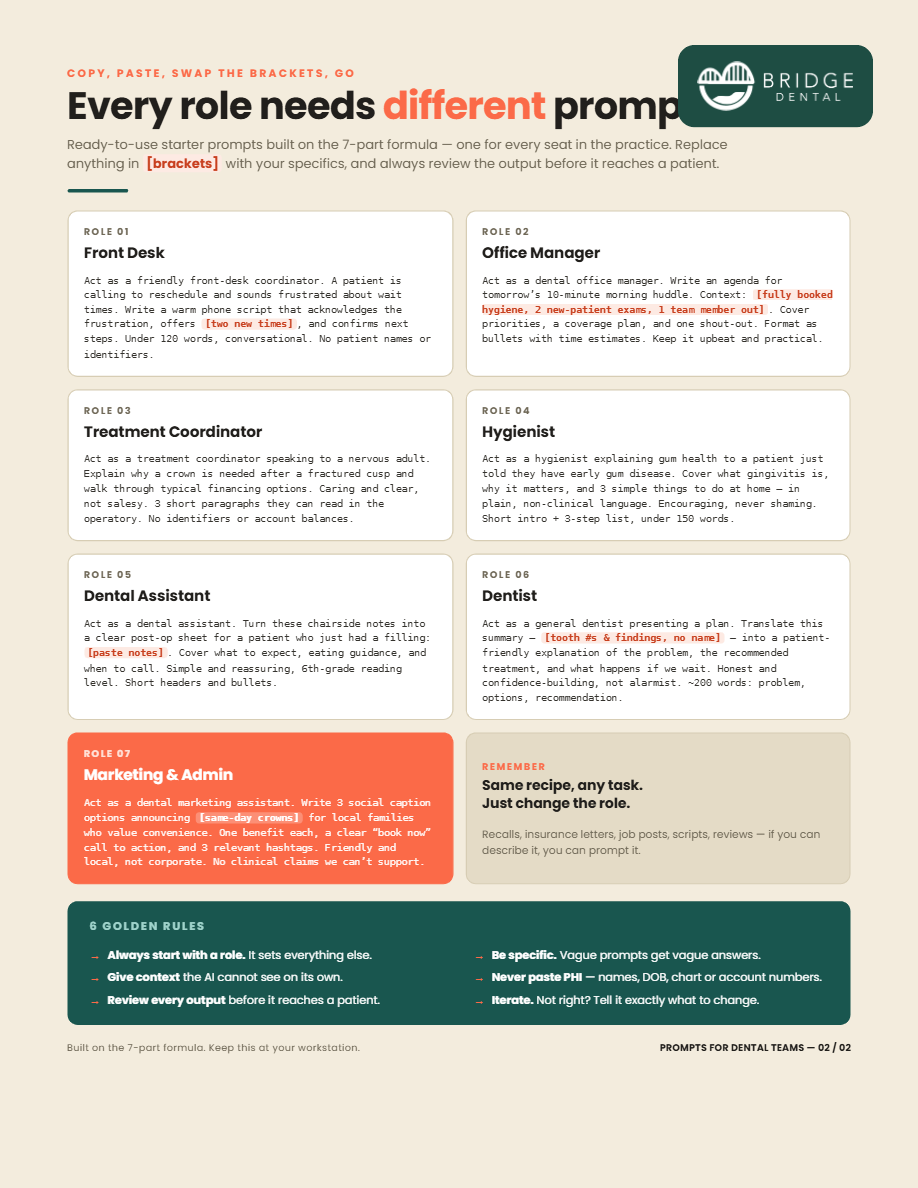
    <div style={{ display:'grid', gridTemplateColumns:'minmax(0,1.1fr) minmax(0,.9fr)', gap:0, background:'#fff', border:'1px solid var(--line)', borderRadius:24, overflow:'hidden', boxShadow:'var(--shadow-md)' }} className="feature">
      <div style={{ padding:'40px 40px 38px', display:'flex', flexDirection:'column', justifyContent:'center' }}>
        <Chip style={{ alignSelf:'flex-start' }}><Ic.spark style={{ fontSize:14 }} /> {r.badge}</Chip>
        <h3 style={{ fontSize:'clamp(24px,2.6vw,32px)', fontWeight:800, letterSpacing:'-.02em', lineHeight:1.1, margin:'16px 0 10px' }}>{r.title}</h3>
        <p style={{ color:'var(--muted)', fontSize:16, margin:'0 0 24px', maxWidth:440 }}>{r.desc}</p>
        <div style={{ display:'flex', alignItems:'center', gap:12, flexWrap:'wrap' }}>
          <a href={r.file} download className="focus-ring" style={{ display:'inline-flex', alignItems:'center', gap:9, background:'var(--grad)', color:'#fff', fontWeight:700, fontSize:16, padding:'14px 24px', borderRadius:13, boxShadow:'0 10px 24px rgba(50,70,150,.22)' }}>
            <Ic.download style={{ fontSize:19 }} /> Download PDF
          </a>
          <button onClick={()=>onPreview(r)} className="focus-ring" style={{ display:'inline-flex', alignItems:'center', gap:8, font:'inherit', fontWeight:700, fontSize:16, color:'var(--ink)', background:'#fff', border:'1.5px solid var(--line)', padding:'14px 22px', borderRadius:13, cursor:'pointer' }}>
            <Ic.eye style={{ fontSize:18, color:'var(--blue)' }} /> Preview
          </button>
          <span style={{ color:'var(--faint)', fontSize:13.5, fontWeight:600, marginLeft:2 }}>{r.meta}</span>
        </div>
      </div>
      <button onClick={()=>onPreview(r)} className="focus-ring feature-vis" style={{ border:'none', cursor:'pointer', background:'linear-gradient(150deg,#eef3f8,#e7edf6)', padding:'34px 34px 0', position:'relative', overflow:'hidden', display:'flex', alignItems:'flex-end', justifyContent:'center' }}>
        <img src={r.pages[1]} alt="" style={{ position:'absolute', width:'56%', right:24, top:42, transform:'rotate(6deg)', borderRadius:6, boxShadow:'var(--shadow-md)', opacity:.85 }} />
        <img src={r.pages[0]} alt={r.title+' preview'} style={{ position:'relative', width:'72%', borderRadius:'8px 8px 0 0', boxShadow:'var(--shadow-lg)' }} />
      </button>
    </div>
  );
}

/* ---------------- Cover card (role pack) ---------------- */
function CoverCard({ r, onPreview }) {
  const [hover, setHover] = useState(false);
  return (
    <div onMouseEnter={()=>setHover(true)} onMouseLeave={()=>setHover(false)}
      style={{ background:'#fff', border:'1px solid var(--line)', borderRadius:18, overflow:'hidden', display:'flex', flexDirection:'column',
        boxShadow: hover?'var(--shadow-md)':'var(--shadow-sm)', transform: hover?'translateY(-3px)':'none', transition:'transform .25s, box-shadow .25s' }}>
      <button onClick={()=>onPreview(r)} className="focus-ring" style={{ border:'none', padding:0, cursor:'pointer', position:'relative', background:'#EFE9DC', aspectRatio:'1 / 1', overflow:'hidden' }}>
        <img src={r.cover} alt={r.title+' — '+r.desc} style={{ width:'100%', height:'100%', objectFit:'cover', objectPosition:'top' }} />
        <span style={{ position:'absolute', left:'50%', bottom:14, transform:`translateX(-50%) translateY(${hover?'0':'8px'})`, opacity:hover?1:0, transition:'.25s', display:'inline-flex', alignItems:'center', gap:7, background:'#fff', color:'var(--ink)', fontWeight:700, fontSize:13.5, padding:'9px 15px', borderRadius:999, boxShadow:'var(--shadow-md)' }}>
          <Ic.eye style={{ fontSize:16, color:'var(--blue)' }} /> Preview
        </span>
      </button>
      <div style={{ padding:'14px 16px 16px', display:'flex', alignItems:'center', gap:10 }}>
        <a href={r.file} download className="focus-ring" style={{ flex:1, display:'inline-flex', alignItems:'center', justifyContent:'center', gap:8, background:'var(--grad)', color:'#fff', fontWeight:700, fontSize:14.5, padding:'11px 14px', borderRadius:11, boxShadow:'0 7px 16px rgba(50,70,150,.18)' }}>
          <Ic.download style={{ fontSize:17 }} /> Download
        </a>
        <button onClick={()=>onPreview(r)} className="focus-ring" title="Preview" style={{ display:'flex', alignItems:'center', justifyContent:'center', width:44, height:44, color:'var(--ink)', background:'#fff', border:'1.5px solid var(--line)', borderRadius:11, cursor:'pointer', fontSize:19 }}>
          <Ic.eye />
        </button>
      </div>
    </div>
  );
}

/* ---------------- Lightbox (real PDF) ---------------- */
function Lightbox({ r, onClose }) {
  useEffect(()=>{
    const k=(e)=>{ if(e.key==='Escape')onClose(); };
    window.addEventListener('keydown',k); return ()=>window.removeEventListener('keydown',k);
  },[onClose]);
  return ReactDOM.createPortal((
    <div onClick={onClose} style={{ position:'fixed', inset:0, zIndex:60, background:'rgba(16,22,34,.72)', display:'flex', flexDirection:'column', alignItems:'center', justifyContent:'center', padding:'24px 24px' }}>
      <div onClick={e=>e.stopPropagation()} style={{ width:'min(840px,94vw)', display:'flex', alignItems:'center', justifyContent:'space-between', color:'#fff', marginBottom:12, gap:12 }}>
        <div style={{ minWidth:0 }}>
          <div style={{ fontWeight:800, fontSize:17, letterSpacing:'-.01em', whiteSpace:'nowrap', overflow:'hidden', textOverflow:'ellipsis' }}>{r.title}</div>
          <div style={{ fontSize:13, color:'rgba(255,255,255,.7)', fontWeight:600 }}>{r.badge ? r.badge+' · ' : ''}{r.meta}</div>
        </div>
        <div style={{ display:'flex', alignItems:'center', gap:10, flex:'0 0 auto' }}>
          <a href={r.file} download style={{ display:'inline-flex', alignItems:'center', gap:8, background:'#fff', color:'var(--ink)', fontWeight:700, fontSize:14.5, padding:'10px 18px', borderRadius:11 }}><Ic.download style={{ fontSize:17 }} /> Download</a>
          <button onClick={onClose} className="focus-ring" style={{ display:'flex', background:'rgba(255,255,255,.16)', border:'none', color:'#fff', width:42, height:42, borderRadius:11, alignItems:'center', justifyContent:'center', cursor:'pointer', fontSize:20 }}><Ic.close /></button>
        </div>
      </div>
      <div onClick={e=>e.stopPropagation()} style={{ width:'min(840px,94vw)', height:'min(80vh,1040px)', background:'#fff', borderRadius:12, overflow:'hidden', boxShadow:'var(--shadow-lg)' }}>
        <iframe title={r.title} src={r.file + '#toolbar=0&navpanes=0&view=FitH'} style={{ width:'100%', height:'100%', border:'none', background:'#525659' }} />
      </div>
    </div>
  ), document.body);
}

/* ---------------- Unlocked ---------------- */
function Unlocked({ email, onReset }) {
  const [preview, setPreview] = useState(null);
  return (
    <main className="fadeUp">
      <section style={{ background:'var(--grad)', color:'#fff' }}>
        <div style={{ ...WRAP, paddingTop:52, paddingBottom:52 }}>
          <div style={{ display:'inline-flex', alignItems:'center', gap:9, background:'rgba(255,255,255,.16)', padding:'7px 14px', borderRadius:999, fontWeight:700, fontSize:13.5 }}>
            <span style={{ display:'flex', width:20, height:20, borderRadius:'50%', background:'#fff', color:'var(--purple)', alignItems:'center', justifyContent:'center', fontSize:14 }}><Ic.check /></span>
            You're in
          </div>
          <h1 style={{ fontSize:'clamp(28px,3.6vw,42px)', fontWeight:800, letterSpacing:'-.02em', margin:'18px 0 10px', lineHeight:1.08 }}>Thanks — your toolkit is unlocked.</h1>
          <p style={{ fontSize:'clamp(15px,1.4vw,18px)', maxWidth:580, margin:0, color:'rgba(255,255,255,.9)' }}>
            We’ve also sent a copy to <strong style={{ color:'#fff' }}>{email}</strong>. Download anything below, or open a preview first.
          </p>
        </div>
      </section>

      {/* featured */}
      <section style={{ ...WRAP, paddingTop:44, paddingBottom:10 }}>
        <FeatureCard onPreview={setPreview} />
      </section>

      {/* role library */}
      <section style={{ ...WRAP, paddingTop:42, paddingBottom:80 }}>
        <div style={{ display:'flex', alignItems:'baseline', justifyContent:'space-between', flexWrap:'wrap', gap:8, marginBottom:8 }}>
          <h2 style={{ fontSize:24, fontWeight:800, letterSpacing:'-.01em', margin:0, whiteSpace:'nowrap' }}>The Prompt Library — by role</h2>
          <span style={{ color:'var(--faint)', fontSize:14, fontWeight:600 }}>{LIBRARY.length} packs · 5 prompts each</span>
        </div>
        <p style={{ color:'var(--muted)', fontSize:15.5, margin:'0 0 26px', maxWidth:620 }}>One pack for every seat in the practice. Copy, swap the [brackets], review, send.</p>
        <div style={{ display:'grid', gridTemplateColumns:'repeat(auto-fill,minmax(258px,1fr))', gap:22, alignItems:'stretch' }}>
          {LIBRARY.map(r => <CoverCard key={r.id} r={r} onPreview={setPreview} />)}
        </div>
        <div style={{ marginTop:30, padding:'18px 22px', borderRadius:14, background:'var(--bg-soft)', border:'1px solid var(--line)', display:'flex', alignItems:'center', gap:12, color:'var(--muted)', fontSize:14.5, fontWeight:600 }}>
          <Ic.spark style={{ fontSize:18, color:'var(--purple)' }} /> More resources are on the way — they’ll appear here automatically.
        </div>
      </section>

      {preview && <Lightbox r={preview} onClose={()=>setPreview(null)} />}
    </main>
  );
}

/* ---------------- Footer ---------------- */
function Footer({ unlocked, onReset }) {
  return (
    <footer style={{ borderTop:'1px solid var(--line)', background:'var(--bg-soft)' }}>
      <div style={{ ...WRAP, paddingTop:34, paddingBottom:34, display:'flex', alignItems:'center', justifyContent:'space-between', flexWrap:'wrap', gap:16 }}>
        <div style={{ display:'flex', alignItems:'center', gap:14 }}>
          <Logo height={28} />
          <span style={{ color:'var(--faint)', fontSize:13.5 }}>© 2025 Bridge Dental. All rights reserved.</span>
        </div>
        <div style={{ display:'flex', alignItems:'center', gap:22, fontSize:14, fontWeight:600, color:'var(--muted)' }}>
          <a className="navlink" href="https://www.bridgedental.ai/" target="_blank" rel="noreferrer">bridgedental.ai</a>
          {unlocked && <button onClick={onReset} style={{ font:'inherit', fontWeight:600, color:'var(--muted)', background:'none', border:'none', cursor:'pointer' }}>Use a different email</button>}
        </div>
      </div>
    </footer>
  );
}

/* ---------------- App ---------------- */
function App() {
  const [unlocked, setUnlocked] = useState(false);
  const [email, setEmail] = useState('');
  useEffect(() => {
    try {
      const u = localStorage.getItem('bridge_unlocked');
      const e = localStorage.getItem('bridge_email');
      if (u === '1' && e) { setUnlocked(true); setEmail(e); }
    } catch {}
  }, []);
  const unlock = (e) => {
    setEmail(e); setUnlocked(true);
    try { localStorage.setItem('bridge_unlocked','1'); localStorage.setItem('bridge_email', e); } catch {}
    window.scrollTo({ top:0, behavior:'smooth' });
  };
  const reset = () => {
    setUnlocked(false); setEmail('');
    try { localStorage.removeItem('bridge_unlocked'); localStorage.removeItem('bridge_email'); } catch {}
    window.scrollTo({ top:0, behavior:'smooth' });
  };
  return (
    <>
      <style>{`
        .navlink:hover{color:var(--ink)}
        @media (max-width:760px){ .feature{grid-template-columns:1fr !important} .feature-vis{min-height:300px} }
      `}</style>
      <Nav unlocked={unlocked} onReset={reset} />
      {unlocked ? <Unlocked email={email} onReset={reset} /> : <Gate onUnlock={unlock} />}
      <Footer unlocked={unlocked} onReset={reset} />
    </>
  );
}

window.App = App;